







MP 3009X
Get A Quote
When TwinCAT throws a system error, it usually happens at the worst possible moment: a commissioning deadline, a night shift, or a production restart after maintenance. As an industrial automation engineer, you need a structured way to read those cryptic messages, decide whether the problem is communication, real time, fieldbus, or application code, and get the machine back into a safe, stable state without guesswork. This guide consolidates practical troubleshooting patterns from Beckhoff documentation, integrator notes, and real-world forum cases into a single, field-oriented manual for TwinCAT system errors.
This is not a replacement for Beckhoff’s official manuals. Instead, it is a pragmatic layer on top, focused on error symptoms you are likely to see on site: ADS connection faults, real‑time startup failures, fieldbus configuration problems, and module status word errors. Everywhere possible, the guidance is tied back to documented behavior or published case studies, not speculation.
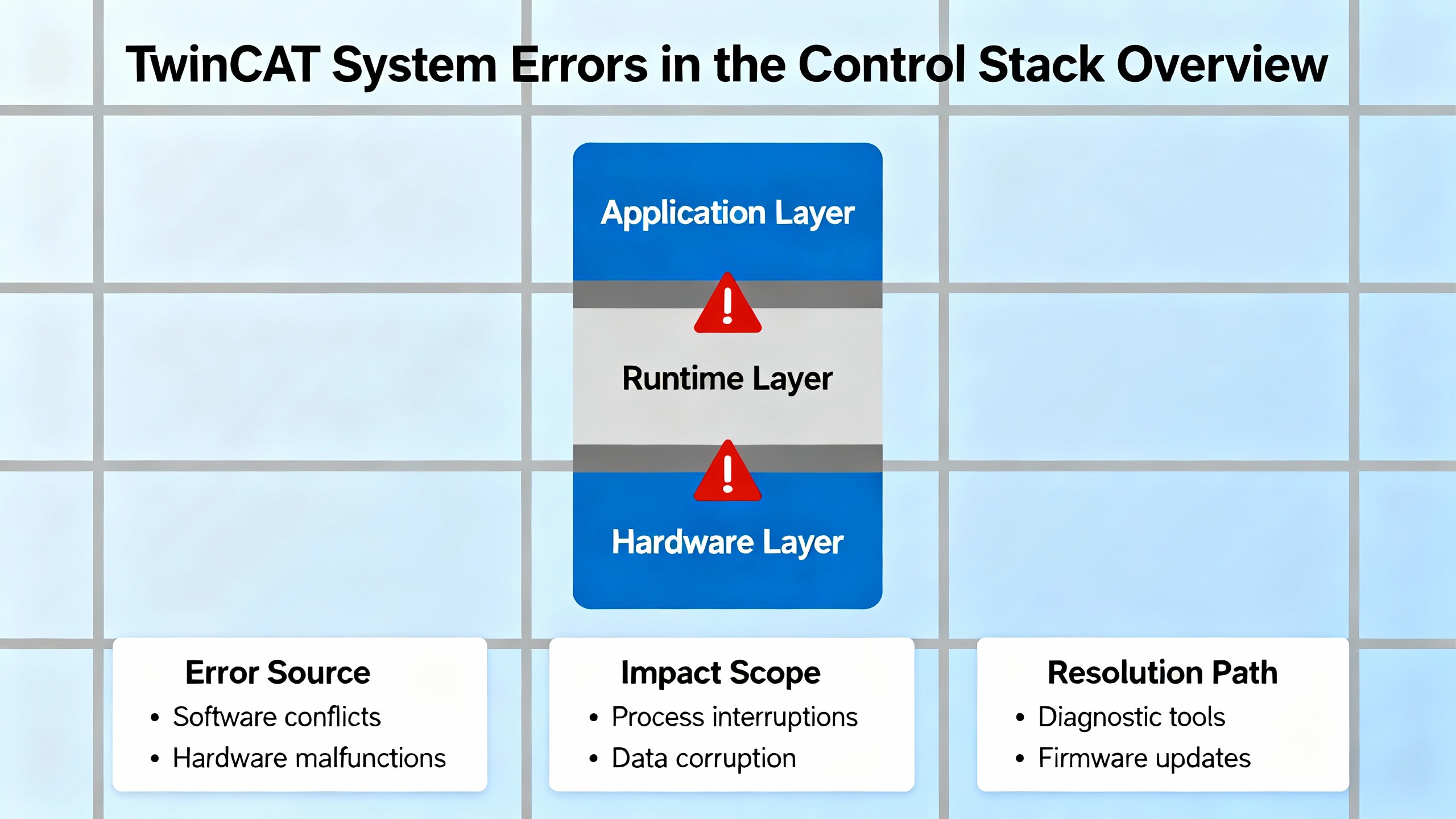
TwinCAT is a PC-based automation platform that combines Industrial PCs, I/O and fieldbus components, drive technology, and automation software under Beckhoff’s “New Automation Technology” philosophy. System errors in this environment usually fall into four layers.
The communication and routing layer covers ADS and AMS routes between engineering PC, HMI, and PLC runtimes. Misconfigured routes or wrong ports show up as connection-level errors before your PLC code even runs.
The real-time runtime layer includes the TwinCAT real-time kernel, CPU core assignment, and interaction with virtualization technologies. If the real-time system cannot start, you will see RTIME-related warnings or errors when switching to Run mode.
The fieldbus and I/O layer includes EtherCAT, Interbus, and terminal-level diagnostics. Issues here appear as startup messages about devices that cannot be opened or configurations that cannot be activated, along with status words at the channel level.
Finally, the application and module layer includes PLC programs, TcCOM modules, and higher-level error management. Tools like the TwinCAT error management function and the Simulink integration toolchain tie into this layer.
The rest of this manual is organized along those layers so you can quickly home in on the likely root cause of a given TwinCAT system error.
In many brownfield plants, you will find a mix of TwinCAT 2 runtimes and newer TwinCAT 3 systems. An engineer on an industrial maintenance forum demonstrated that a PC running TwinCAT 3 engineering can talk to a PLC running TwinCAT 2 by simply configuring an AMS route to the TwinCAT 2 target. No changes to the TwinCAT 2 PLC program are required because the integration happens entirely in the TwinCAT 3 System view, which corresponds to the standalone TwinCAT 2 System Manager.
Once that AMS route is in place, the TwinCAT 3 engineering environment can scan EtherCAT I/O on the TwinCAT 2 controller and inspect parameters via the CoE tab. The same principle applies to HMIs that use ADS, such as legacy Visual Basic HMIs built on AdsOcx. The HMI PC must have a valid AMS route to the PLC regardless of whether it runs TwinCAT 2 tools, TwinCAT 3, or only the ADS client libraries.
A key point from that case study is that the HMI or engineering PC should be treated as version-agnostic. What matters is that the AMS routes, ADS ports, and symbol naming conventions are all configured correctly for each PLC runtime.
Two details frequently bite engineers when moving between TwinCAT versions: ADS port numbers and global variable naming.
A community integration example notes that TwinCAT 2 runtime “runtime 1” uses ADS port 801, while TwinCAT 3 runtime typically uses port 851. If your HMI or middleware always assumes 801, it will fail as soon as you point it at a TwinCAT 3 PLC, even if the IP address and AMS route are correct.
Global variables also follow different naming conventions. On TwinCAT 2, HMI code may address global variables as “.var1” or similar, while TwinCAT 3 expects “GVL.var1” or the specific global variable list name. Because of these differences, one VB6 HMI example requires users to explicitly select whether they are talking to TwinCAT 2 or TwinCAT 3 and then enter the PLC’s AMS ID and the appropriate ADS port. The code branches on that selection to choose port 801 or 851 and adjust symbol names accordingly.
If you see TwinCAT system or HMI errors that suggest “symbol not found” or “target port not found” even though the PLC is running, double-check these version-specific details first.
A troubleshooting guide for ADS connectivity with Beckhoff PLCs breaks errors into two categories: instance-level errors, which describe the connection to the ADS device, and item-level errors, which describe access to individual symbols or variables.
At the instance level, “Target port not found – ADS Server not started” means that the configured PLC IP address is not responding as an ADS server. The recommended approach is to confirm the IP address, ping the device, and ensure that the SIA Connect gateway or HMI is on the same network as the PLC. If ping fails, you have a pure network problem, not a TwinCAT problem.
The “Invalid ADS port” instance error indicates that you are talking to the right IP address but the wrong port on that device. The practical fix is to verify the ADS port in the Beckhoff documentation or project and correct it in your client. As mentioned earlier, port 801 is typical for TwinCAT 2 runtime 1 and port 851 for TwinCAT 3 runtime. Connecting to 801 on a TwinCAT 3 PLC is a classic way to trigger this error.
The “Access denied” instance error points to an AMS route that does not allow communication from your client back to the PLC. In the Beckhoff engineering tool, you must locate the ADS route for the failing PLC and ensure that the “Unidirectional” option is not set. The route must allow bidirectional ADS communication so that both sides can initiate and respond to ADS commands.
At the item level, “Symbol not found” usually means the variable name does not exist on the PLC or you are querying the wrong device. The recommended action is to check the spelling of the symbol, make sure the PLC project has been downloaded with symbol information, and confirm that the client instance is connected to the correct ADS device and port.
“Timeout elapsed” at the item level indicates that the symbol is valid but reading it takes too long. This can happen when you are polling too many variables too frequently, or when the PLC or gateway port path adds extra latency. The SIA Connect guide specifically notes that using a higher-latency port path can exacerbate this problem and recommends reducing the number or frequency of reads.
Pulling these ideas together, a disciplined ADS troubleshooting approach starts at the instance level with IP reachability, ADS port, and route direction, then moves to item-level symbol names and read frequency. This prevents you from chasing phantom PLC bugs that are actually configuration issues in your client or network.
In TwinCAT 3, switching the system to Run mode requires the real-time kernel to configure the system timer and start its ticker. On one TwinCAT 3.1 Engineering Edition installation running on Windows 8.1, an engineer reported “Error 15” in the TwinCAT system messages whenever they switched a simple test program into Run. The detailed message contained an RTIME warning: “AdsWarning: 4115 (0x1013, RTIME: system clock setup fails.)”, along with a hint from the vendor.
The hint explicitly advised running the script win8settick.bat in the TwinCAT 3.1 System directory as an administrator and then rebooting the PC. According to the forum report, the failure was tied to the way Windows 8 and 8.1 handle the system tick and how TwinCAT expects to control it for real-time purposes.
The practical takeaway is that when you see AdsWarning 4115 or a message about the real-time ticker failing to start on a Windows 8 or similar system, your first actions should be to locate win8settick.bat under the TwinCAT System directory, run it with elevated rights, and restart the machine. That script adjusts the operating system tick configuration so that the TwinCAT real-time kernel can own the timer.
The same script appears in other support cases as part of the standard remedy for real-time startup issues, reinforcing that it is a key tool in your troubleshooting kit for RTIME errors.
On more recent hardware and operating systems, real-time startup problems often trace back to virtualization technologies rather than the classic Windows tick configuration. A Stack Overflow case involving a physical HP ZBook G9 laptop running Windows 11 Pro illustrates this clearly.
On that machine, configuring TwinCAT to use an isolated CPU core caused the error “TCRTIME (200): start of real-time avoided by 'HyperV'”. When the engineer instead configured TwinCAT to share a core with Windows, they encountered “AdsError: 4124 (0x101c, RTIME: activated CPU(s) not present on target)”. System information showed that virtualization-based security was “Activated but not running”, suggesting that parts of Hyper‑V or related security features were still influencing the system.
Several commonly suggested tweaks did not resolve the issue. The breakthrough came when Beckhoff support identified that TwinCAT had likely been installed without full administrator rights. The recommended fix was to rerun the TwinCAT installer executable explicitly as an administrator, use the Repair function, and then run win8settick.bat with elevated rights. This combination allowed the installer to correctly register the necessary real-time components and reconfigure the underlying Windows timing behavior.
The lesson here is twofold. First, on systems where Hyper‑V, virtualization-based security, or similar technologies exist, they can interfere with TwinCAT’s ability to start its real-time kernel and to bind to specific CPU cores. Second, an installation performed without sufficient privileges can leave critical real-time pieces in a half-installed state that only a repair with administrative rights can fix.
From a troubleshooting standpoint, when you see messages referring to Hyper‑V preventing real time or RTIME errors about “activated CPU(s) not present on target”, you should not only review your TwinCAT CPU isolation settings but also confirm that TwinCAT was installed or repaired with full administrator privileges and that the vendor-supplied tick script has been executed.
Running TwinCAT in a virtual machine is common in engineering offices, but it has hard limits. A VirtualBox community discussion on TwinCAT 3.1 runtime in 64‑bit Windows guests revealed an important constraint: TwinCAT 3 x64 runtime requires Intel VT‑x hardware virtualization to be present and visible inside the guest operating system. At the time of that discussion, VirtualBox 4.3.x did not support nested virtualization, so even if VT‑x was enabled in the host BIOS and VirtualBox was using hardware acceleration, the guest operating system could not see the VT‑x flag.
As a result, TwinCAT 3 on a 64‑bit guest reported that VT‑x was not supported and refused to enter Run mode in the way the documentation required. The VirtualBox setting “Enable VT‑x/AMD‑V” controlled how VirtualBox itself runs on the host but did not pass VT‑x through to the guest.
Users discovered a workaround that does not depend on nested virtualization. On a multi-core system, they limited Windows to use one fewer core through the operating system boot options, then in TwinCAT real-time settings they read the configuration from the target and assigned TwinCAT to the isolated core. This core-isolation approach helped TwinCAT enter Run mode both on physical PCs and inside VirtualBox guests, provided there were at least two cores available. One user cautioned that assigning all but one core to the virtual machine and then attempting to block one core via boot settings could prevent Windows from starting; the fix was to give the guest fewer cores in the hypervisor and then isolate one inside the guest.
Later versions of VirtualBox added preliminary support for nested VT‑x on some hosts, and from that point forward the ability to pass virtualization extensions into guests improved. However, the underlying message remains relevant: when TwinCAT reports VT‑x-related errors or refuses to start its real-time environment within a VM, you must verify whether nested virtualization is actually supported and enabled in your hypervisor, and if not, consider core isolation or a native installation as alternatives.
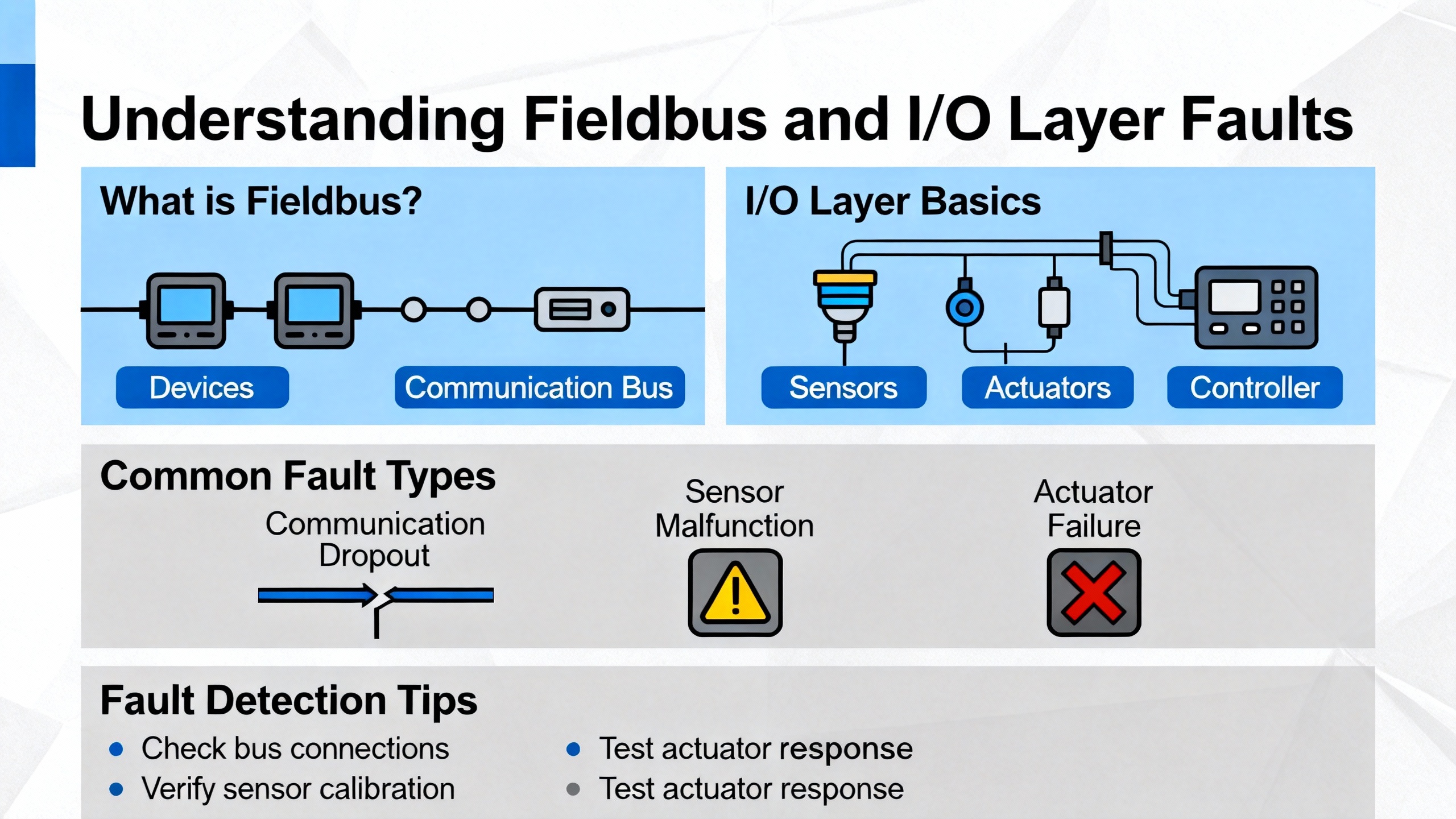
EtherCAT is Beckhoff’s preferred real-time Ethernet-based fieldbus for distributed I/O. When EtherCAT is not happy, it often manifests in TwinCAT as devices not reaching the correct state, I/O not updating, or system messages that do not immediately pinpoint the bad cable or device. A practical guide aimed at TwinCAT beginners emphasizes that the way out of this confusion is to use TwinCAT’s own EtherCAT diagnostic tools in a systematic way.
The first line of defense is cyclical diagnostics, including checksums and error counters. These counters let you see whether communication errors are accumulating over time on particular slaves or segments, which can reveal issues like marginal cables or connectors that only misbehave intermittently.
Next, monitoring device states via the EtherCAT state machine (INIT, PRE-OP, SAFE-OP, OP) helps you verify that each slave is where it should be. If a device refuses to leave SAFE-OP or repeatedly falls back from OP, that is your cue to drill into its parameters and error registers.
The EtherCAT topology view in TwinCAT gives you a visual map of the network and lets you locate where in the chain a fault is occurring. An emergency scan function can send targeted test frames to help localize stubborn problems that do not show up clearly in basic diagnostics, such as a particular cable or slave that fails only under load.
The overarching recommendation from that EtherCAT troubleshooting guide is to treat diagnostics as a structured process, not a last resort. Start with basic counters and states and only move on to topology analysis and emergency scans when simple checks do not explain the behavior. That prevents you from immediately suspecting TwinCAT or PLC code when the problem is actually a single connector in the cabinet.
Not every TwinCAT project uses EtherCAT. In some legacy systems, field I/O hangs off an Interbus master card in the Beckhoff IPC. A real-world support request involving TwinCAT 2 provides a good example of how such fieldbus problems present at startup.
On that system, TwinCAT displayed the startup message “Error starting TwinCAT system! Init17\IO: Open Devices: Device IBS Master 1 (IBS SC/I-T) opened .. AdsWarning: 8322 (0x2082, IO:IBS SC activate config failed)”. The failing device was identified as an Interbus IBS Master 1 PCI card serving as the master for the Interbus network. The user checked all Interbus modules and cables and even replaced the IBS PCI card and reinstalled drivers. Despite these efforts, the TwinCAT startup error persisted.
The error code 8322 was reported as an I/O-level warning that the IBS SC configuration activation had failed. The absence of a specific slave device in the error text made it harder to pinpoint the issue. Previous failures on that machine had referenced particular couplers, but this message pointed only to the master interface.
While that case did not include a confirmed fix, it illustrates a typical pattern. When TwinCAT cannot activate a fieldbus configuration even after hardware replacement, the fault may lie deeper in the configuration or in the communication between TwinCAT and the fieldbus driver. At that point, comparing the current configuration against a known good backup, reviewing the Interbus configuration tool settings, and checking for driver version mismatches become as important as checking cables.
Fieldbus-level errors are not the only place where TwinCAT exposes fault information. Many Beckhoff analog input terminals provide a status word alongside the measured value. A Stack Overflow discussion focused on the “correct” way to handle errors for analog input cards highlights a pattern that works well in practice.
Instead of scattering raw channel values and status words across the PLC application, one experienced engineer prefers to define a structured type for each channel, such as a structure containing a temperature as an integer and a status as a word. This structure is then used as mapped input data from the terminal.
A dedicated function block is created to handle each channel or module, encapsulating both scaling and error interpretation. In the example, the function block takes a configurable scaling factor and outputs the scaled temperature as a real, along with flags for error, underrange, and overrange. The status word bits are interpreted such that the first bit indicates underrange, the second overrange, and the third a generic error condition. Rising-edge triggers are used to log events only when errors appear, not on every cycle.
The engineer also demonstrates that this function block can rely on variables declared with TwinCAT’s memory mapping attributes so that the I/O image links directly into the structured input. Multiple instances of the function block can then be created, one per channel, in a simple loop.
Although this discussion is not about “system errors” in the narrow sense, the approach shows how to turn low-level terminal status bits into clear, per-channel fault states that your HMI and higher-level error management can consume. When an analog channel goes out of range, the PLC logic already understands and labels the event in context, instead of leaving it as an opaque status word.
Communication and runtime issues often appear to operators as “system errors” even when the underlying cause is on the engineering or HMI side. Several practical details from integrator experiences are worth noting.
First, TwinCAT 3 can often be installed on an HMI or engineering PC without a license, because the PLC runtime carries the license. TwinCAT 2 System Manager is also license-free for system configuration tasks. This allows one engineering laptop to work against multiple PLCs, even across TwinCAT versions, as long as each PLC has its own licensed runtime.
Second, some developers keep a dedicated laptop with a full TwinCAT 2 programming license for projects that still require editing TwinCAT 2 PLC code, while using TwinCAT 3 tools on their primary workstation purely as a system manager and HMI client. This separation keeps licensing simple and avoids version conflicts while still taking advantage of modern engineering tools for configuration and diagnostics.
Third, HMI applications based on ADS, whether classic VB6 HMIs using AdsOcx or more modern systems, do not need to match the TwinCAT version of the PLC. They simply need a correct AMS route, the proper ADS port (801 or 851 as described earlier), and symbol naming that matches the PLC project. Treating the HMI as version-agnostic reduces unnecessary restrictions on the engineering environment.
From a troubleshooting perspective, this means that when you see system errors that “go away” when you engineer from a different PC, you should consider user permissions, AMS route configuration, and licensing state on the engineering workstation as part of the root-cause analysis, rather than assuming the PLC hardware is at fault.
Beckhoff provides a dedicated TwinCAT 3 function package for error management, as indicated by the TF5200 Error Management manual. While the specific content of that manual is not available in the notes here, its existence underscores that Beckhoff expects complex projects to centralize and structure their error handling rather than treating each module in isolation.
A separate Beckhoff manual describes integrating MATLAB and Simulink with TwinCAT 3 via two tools: TE1400 TwinCAT Target for Simulink and TE1410 Interface for MATLAB/Simulink. TE1400 uses Simulink Coder to generate real-time capable TcCOM modules from Simulink block diagrams. These modules can be instantiated, parameterized, and debugged in the TwinCAT 3 engineering environment and executed in the TwinCAT 3 runtime. Application areas include rapid control prototyping, real-time simulation, and hardware-in-the-loop simulation, where controllers and plants modeled in Simulink run directly against real hardware in TwinCAT.
TE1410 builds an ADS-based communication interface between the TwinCAT runtime and MATLAB/Simulink, implemented as Simulink block libraries for data exchange and control. The manual specifies system requirements such as MATLAB/Simulink R2010a or newer and TwinCAT 3.0 or newer and emphasizes that the documentation is intended for trained specialists in control, automation, and drive engineering. Safety guidance is formalized with standardized terms like DANGER, WARNING, and CAUTION to describe different risk levels, and users are instructed to follow applicable laws and standards.
From a troubleshooting standpoint, when projects use generated TcCOM modules from Simulink, you must consider those modules as part of your error path. If a system error appears only when a particular model-based controller is active, you should check how the module was built, whether the Simulink model used a fixed-step solver with the TwinCAT target file, and whether any module-specific error outputs or logs are being raised. Data type mismatches and module configuration errors can surface as system or task-level problems in TwinCAT, even though the root cause lies in how the module was generated.
The following table brings together several specific error codes and messages discussed above, along with their observed layers, causes, and practical actions based on the referenced sources.
| Error or message | Layer | Likely cause (per sources) | Practical action (per sources) |
|---|---|---|---|
| AdsWarning 4115 (RTIME: system clock setup fails) | Real-time kernel initialization | System tick configuration on Windows 8 or similar prevents TwinCAT from owning the clock | Run the win8settick.bat script from the TwinCAT System directory as administrator, then reboot the PC |
| “Error starting TwinCAT system … IO: IBS SC activate config failed” (Ads 8322) | Fieldbus (Interbus) | Interbus master card configuration activation fails despite hardware appearing intact | Verify IBS master configuration and drivers against a known good setup; review Interbus network configuration beyond cabling |
| “Target port not found – ADS Server not started” | ADS instance connection | PLC IP address not responding as an ADS server or unreachable network path | Confirm IP address, ping the PLC, and ensure the client and PLC are on the same network segment |
| “Invalid ADS port” | ADS instance configuration | ADS port configured incorrectly for the target TwinCAT version | Set ADS port to typical defaults such as 801 for TwinCAT 2 runtime 1 or 851 for TwinCAT 3 runtime, based on documentation |
| “Access denied” (instance) | ADS routing | AMS route does not permit communication from the client (unidirectional route) | Edit the ADS route in the Beckhoff engineering tool and ensure the unidirectional option is disabled for bidirectional access |
| “Symbol not found” | ADS item access | Requested variable name does not exist on the device or on that ADS route | Check spelling, verify symbol export from the PLC, and confirm the client is bound to the correct ADS device and port |
| “Timeout elapsed” (item) | ADS item access | Item is valid but read operations are too heavy or path latency is high | Reduce number or frequency of reads; avoid high-latency paths that exacerbate timing issues |
| “TCRTIME (200): start of real-time avoided by HyperV” | Real-time startup | Hyper‑V or virtualization-based security features block TwinCAT real-time kernel activation on the host system | Repair TwinCAT installation with administrator rights and run the tick configuration script; review OS virtualization settings |
| AdsError 4124 (RTIME: activated CPU(s) not present on target) | Real-time CPU assignment | TwinCAT real-time configuration references CPU cores that are not active or available | After repairing installation, re-read CPU configuration from target and ensure assigned cores are valid and present |
| “VT‑x is not supported” in a 64‑bit Windows guest running TwinCAT 3 | Virtualization and real-time | VT‑x required by TwinCAT runtime is not visible to the guest because nested virtualization is not supported or enabled | Use core isolation as a workaround or move TwinCAT runtime to a host or virtualization solution that supports nested VT‑x |
Using such a table during commissioning helps keep your troubleshooting grounded in known behaviors rather than guesswork.
Putting all of this together, an effective TwinCAT system error workflow follows a consistent pattern, even though the specifics vary from machine to machine.
Start by reading the exact error text and noting whether it mentions ADS, RTIME, a particular fieldbus device, Hyper‑V, or VT‑x. Knowing which layer is complaining is half the battle. If the error clearly mentions ADS or target ports, treat it as a communication problem and work through network reachability, ADS port selection, AMS route direction, and symbol naming, drawing on guidance from sources like the SIA Connect troubleshooting notes and mixed TwinCAT 2 and 3 integration examples.
If the error mentions RTIME or an inability to start real time when switching to Run, focus on the operating system and hardware. On Windows 8 and its relatives, the win8settick script is frequently the key step. On newer laptops where Hyper‑V and virtualization-based security are present, verify that TwinCAT was installed or repaired with administrator privileges and that the OS virtualization stack is not blocking access to the resources TwinCAT needs. In virtualized environments, consider whether your hypervisor can expose VT‑x or AMD‑V to the guest and whether the workaround of isolating CPU cores is appropriate.
For errors that cite specific fieldbus devices or configurations, such as Interbus IBS SC activation failures, treat the fieldbus as a subsystem. Check not only hardware and cables but also configuration tools and driver compatibility. On EtherCAT, leverage TwinCAT’s built-in topology, state, and error counter diagnostics rather than depending solely on the presence or absence of I/O updates.
Meanwhile, do not ignore terminal-level indicators. If an analog input channel’s status word says underrange or overrange, and your PLC code does not interpret that status, the operator may only see a vague “system error” on the HMI. Encapsulating scaling and status interpretation in dedicated function blocks, as demonstrated in the analog input error handling example, gives you reliable per-channel diagnostics that feed into your higher-level error management quickly.
Finally, remember that engineering PCs and HMIs are part of the system too. A route that is unidirectional, a port mismatch, or an installation performed without proper rights can present as system errors even though the PLC hardware is fine. When in doubt, test with a known good engineering station or a minimal ADS client and compare results.
You can often run TwinCAT 3 engineering tools inside a virtual machine for testing and development, but running the full real-time runtime with 64‑bit requirements can be constrained by whether your hypervisor supports nested virtualization. If the guest operating system cannot see VT‑x or AMD‑V, TwinCAT may refuse to start real time and report that VT‑x is not supported. In that case you can test PLC logic without hard real time, use core isolation workarounds where appropriate, or move the runtime to a physical machine or a virtualization platform that exposes the necessary CPU features.
“Target port not found – ADS Server not started” points to a connectivity problem at the IP or device level; the PLC is simply not reachable as an ADS server at that address. “Invalid ADS port” means the PLC is reachable but you are addressing the wrong ADS port on that device, often due to confusing TwinCAT 2 and TwinCAT 3 defaults. In the first case you fix the network path; in the second, you correct the configured port value.
In manuals such as the TwinCAT 3 MATLAB/Simulink integration guide, Beckhoff states that the material is intended for trained specialists in control, automation, and drive engineering and that unauthorized changes outside documented configurations void their liability. This is a reminder that TwinCAT systems control real machinery where incorrect configuration can cause equipment damage or personal injury. Treat system error troubleshooting as a professional engineering activity: follow safety procedures, lock out energy where required, and consult official manuals for configuration limits and safety notes, especially when modifying real-time and fieldbus components.
When you approach Beckhoff TwinCAT system errors with this layered, methodical mindset, most problems move from “mysterious” to manageable. The messages are still terse, but they become signposts rather than roadblocks, and you can get production running again without rolling the dice on unproven fixes.


Copyright Notice © 2026 mooreautomated.com All rights reserved,Moore Automated is not an authorized distributor or representative of the manufacturers featured on this website. Brand names and trademarks featured are the property of their respective owners.



Leave Your Comment